
.png&w=3840&q=75)
Is Your Business Ready for Automation? 10 Signs It Might Be Time
Here's a question every growing business should ask: how much of our team's time goes into work a computer could handle?
Not the important work. Not the creative work. Not the work that needs real judgment. Just the repetitive tasks: copying information, updating spreadsheets, sending the same emails, building reports, moving data between systems, checking whether something got done.
None of these look like a big deal on their own. One task takes five minutes. Another takes ten. But when the same small tasks happen every day, they quietly turn into a real cost for the business.
This is where automation earns its place. Automation is not about replacing your team. It is about freeing them from the boring parts so they have more time for work that actually needs a person.
So how do you know if your business is ready? Here are 10 signs to look out for.
Your Team Says, "I Do This Every Day"
This is one of the easiest signs to spot. Ask your employees what takes up most of their day. If you keep hearing things like “I copy this every morning,” “I update the same spreadsheet every afternoon,” or “I have to enter this into two systems,” you likely have an automation opportunity sitting right there.
The task itself might not be hard. The problem is repetition. Say an employee spends 20 minutes each morning preparing a report. That doesn't sound like much, but over a month it adds up to several hours, and over a year it becomes a serious chunk of time. Now multiply that by five employees doing similar tasks, and a small habit turns into a real business cost.
Your Best People Are Doing Basic Admin Work
This one is easy to miss. You hire people for their skills: a salesperson to build relationships, a manager to make decisions, a support team to help customers, a finance team to read the numbers. But what happens when these people spend hours updating records and moving information from one place to another?
Their skills are going to waste on work that doesn't need their full attention. Automation can take over the repetitive parts while your people stay in control of the process. They just spend less time on the mechanical work, which is one of the best reasons to automate in the first place.
The Same Information Lives in Several Places
Here's a situation most businesses know well. A customer places an order. The sales system holds their details. The accounting system has the payment record. The support system logs their requests. And somewhere, a spreadsheet has its own version of the same information.
Someone has to keep all of this in sync. So when a customer updates their phone number, does every system get updated too? Maybe. Maybe not. That's how different systems end up telling different stories about the same customer.
System integration and automation can move information between systems automatically. Instead of people copying the same details over and over, the systems talk to each other, which means fewer duplicate entries and fewer chances for mistakes.
Your Business Runs on "Just Update the Spreadsheet"
Spreadsheets are useful. They're easy to start with and can solve plenty of small problems. But businesses grow, and spreadsheets tend to grow right along with them. One spreadsheet becomes five. Five become twenty. Someone creates a “final” version, then someone else creates a “final final” version, and soon nobody is quite sure which file actually holds the latest numbers.
That confusion is usually a sign the business has outgrown the process. The fix isn't always to throw out every spreadsheet. Often it's simply connecting your existing systems, automating the updates, and giving your team one reliable place to check. Less searching, less copying, less confusion.
Customers Are Waiting for Things That Should Be Fast
Think about your customer experience. A customer fills out a form. What happens next? Does someone have to check it manually, create a task, send a confirmation, and notify another employee? If all of that happens by hand, your customer is waiting on a process that could run on its own.
A simple automation could look like this: the customer submits a request, the system records the details, the customer gets an instant confirmation, the right employee is notified, and a task is created automatically. Nobody has to remember every step. The customer gets a faster response and the employee gets a cleaner workflow. Everyone wins.
Your Reports Take Hours to Prepare
This is another common warning sign. At the end of the week or month, someone opens several systems, downloads files, cleans up the data, checks the numbers, copies everything into a spreadsheet, builds the charts, and fixes the mistakes along the way. By the time the report is finally ready, the person who needed it has often been waiting for days.
A better system can pull and organize this information automatically, and dashboards can show the numbers that matter without anyone rebuilding the same report every time. This doesn't just save time. It gives managers information they can actually act on.
Small Mistake Keep Coming Back
People make mistakes. That will never fully change. But when someone repeats the same task hundreds of times, mistakes become more likely: a number entered wrong, a customer record missed, a file sent to the wrong person, a step forgotten.
One mistake here or there might not hurt much, but repeated mistakes create real problems over time. Automation makes rule-based tasks more consistent. If every order needs a customer record created, inventory updated, and finance notified, the system can handle those steps the same way every time, and your employees can focus their attention where it's actually needed: on anything unusual.
Your Business Is Growing, but Your Process Has Not
This is where a lot of companies run into trouble. A process that worked fine for 10 employees may not hold up at 50. A workflow built for 100 customers can get messy at 5,000. Growth has a way of exposing weak processes.
More orders, more customers, more employees, more data, more systems. If the work is still handled the same way it always was, your team ends up working harder just to keep pace. Automation helps a business take on more work without piling on the same amount of manual effort. Not every process needs it, but your systems should be able to grow alongside your business.
Your Employees Spend To Much Time Looking for Information
This sounds like a small problem. It isn't. Think about how often someone asks, “Where's that file?” or “Which spreadsheet is the latest one?” or “Who's handling this?” Each question only takes a few minutes to answer, but across a whole team, those minutes add up fast.
Good systems make information easy to find. Good integrations move information to where it needs to be. Good automation cuts down the manual steps between an employee and the answer they're looking for. The result: less time searching, more time actually working.
Your team Keeps Saying, "There Must Be a Better Way"
This might be the biggest sign of all. Your employees already know where the problems are, because they live with them every day. They know which process takes too long, which spreadsheet causes headaches, which report is painful to prepare, and which customer request takes far too many steps.
Sometimes the best automation ideas come from simply listening to your team. Ask them what's the most frustrating part of their day, then ask which part of that work they repeat the most. That answer might just be your first automation project.
But Should You Automate Everything?
No. This is where businesses sometimes get automation wrong. Automation isn't automatically good just because it's automation. If a process is badly designed to begin with, automating it just makes the bad process run faster.
Before automating anything, take time to understand it. Look at every step. Ask who does it and why. Find out where the delays happen and where the mistakes creep in. Then decide which parts genuinely need automation.
Sometimes the answer isn't new software at all. Sometimes it's simply removing a step that never needed to exist. Good automation starts with understanding the business, not with picking a tool.
Start With One Problem
You don't need to automate your entire company, and honestly, that's usually a bad place to start. Pick one process instead: customer onboarding, invoice processing, report creation, lead management, or moving information between two systems. Look for something that happens often and has clear, repeatable steps, then improve that one thing.
Say a company receives 500 customer requests a month. Right now, an employee reads each one, copies the details into another system, sends a confirmation email, and notifies the right team. That might take just a few minutes per request, but 500 requests a month can turn those minutes into many hours of work.
A simple workflow could handle the first few steps automatically, so the employee only steps in when the request actually needs human judgment. That's a far better use of their time.
A good first automation project usually shares a few traits:
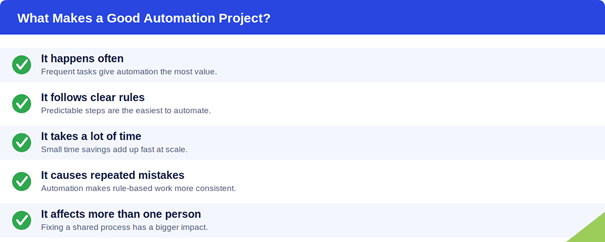
Once the project is done, these are the questions worth asking: did the process get faster, did mistakes go down, did employees save real time, did customers get quicker responses, and did the business cut out unnecessary work? If you can answer those, you'll know whether it was worth doing.
Automation Should Give People Their Time Back
There's a better way to frame this whole conversation. Instead of asking “how many jobs can we automate,” ask “how much unnecessary work can we remove?” That small shift in wording changes everything.
Your team is still the most important part of the business. People understand customers. People make decisions. People solve the unusual problems and come up with new ideas. Technology is good at repetitive work. People are good at work that needs judgment. The strongest businesses lean on both.
The First Step Is Not Buying Software
This might be the most important point in this whole article. You don't need to start by buying an expensive automation platform. Start with a conversation instead.
Talk to your team. Watch how work actually moves through the business. Find the slow points, the repeated tasks, the places where information gets copied by hand, and the moments where people are just waiting. Only after that should you start thinking about technology.
The right fix might be workflow automation, an API integration, a custom application, a cloud solution, a better data system, or sometimes just a simpler process. The technology should follow the business need, never the other way around.
So, Is Your Business Ready?
If your business has grown, your processes should have grown with it. If your team spends hours on repetitive work, there's probably a better way. If customers are waiting on things that should be instant, there's probably a better way. If your systems don't talk to each other, or your team is stuck updating spreadsheets and fixing the same mistakes on repeat, there's probably a better way there too.
You don't have to fix everything at once. Start small. Pick one problem, fix it properly, measure the result, then move on to the next. That's how real automation should work: not as one giant technology project or a race to use the newest tool, but as a practical way to make everyday work easier.
Final Thought
The best automation isn't the most complicated one. It's the automation your employees actually notice, because their day genuinely gets easier: less copying, less checking, less waiting, less searching, and more time for customers, decisions, and the work that actually matters.
If your team keeps saying “there must be a better way to do this,” listen to them. That might be exactly where your next big improvement starts.
At Kenora Technologies, we look at automation from the business side first. We focus on understanding how work gets done, where time is being lost, and where technology can genuinely simplify things. From workflow automation and system integration to custom software, cloud solutions, and data management, the goal stays the same: build technology that makes business easier, not more complicated.