
.png&w=3840&q=75)
5 Business Tasks AI Can Help With Today
Imagine your team finishing a two hour task in twenty minutes. That is one big reason so many businesses are paying closer attention to AI right now.
AI is not just about chatbots or futuristic technology anymore. Businesses are already using it for everyday work: saving time, organizing information, and helping teams get more done.
That said, you do not need to use AI for everything. The smarter move is to find the tasks that eat up too much time, repeat again and again, or are hard to manage by hand.
Here are five business tasks where AI can already help today.
1. Managing Repetitive Data Work
Data is everywhere in business. Customer details, invoices, forms, orders, emails, and reports all create work for your team.
A lot of this work repeats itself. Someone reads information from a document, types it into a system, checks it, then moves it somewhere else. Doing that once is simple. Doing it hundreds of times a week is a different story.
AI can help businesses read and organize information much faster. For example, a company that receives hundreds of customer forms could use AI to pull out names, email addresses, order numbers, dates, and other key details, then send that information to the right system.
Employees can still review the results, especially when accuracy matters. The difference is they spend less time on basic data entry and more time on the work that actually needs their attention.
AI does not have to replace the person doing the work. It can simply take the repetitive part off their plate.
2. Answering Common Customer Questions
Customer support teams answer the same questions every single day. What are your opening hours? How do I track my order? How do I reset my password? Where can I find this information?
These questions are simple, but answering them over and over takes real time. AI assistants and chatbots can handle many of these automatically. A customer types a question on your website and gets an answer right away. If the question is more complicated, the conversation gets passed to a real person.
AI handles the common questions. People handle the problems that need a human touch.
This helps businesses respond faster while giving support teams more time to focus on customers who really need help.
3. Reading and Summarizing Documents
Business teams deal with a lot of paperwork. Reports, meeting notes, proposals, contracts, research, and invoices pile up fast, and reading through all of it takes time.
AI can summarize long documents and bring the important parts to the front. Picture a manager who receives a thirty page report. Instead of digging through it for the main points, AI can put together a short summary that covers things such as:
- Main points
- Important numbers
- Possible problems
- Key changes
- reas that need attention
The manager can then decide which parts deserve a closer look.
AI can also compare information across multiple documents. A business weighing different supplier proposals, for instance, could use AI to line up price, delivery time, services, and requirements side by side.
The final call should always come from the people responsible for the business. AI just helps them get there faster.
4. Creating Reports and Business Content
Many teams spend hours preparing simple reports: gathering information, organizing it, writing it up, and sending it along to a manager or another team.
AI can speed up parts of that process. Say a sales team has a week's worth of sales data. AI could turn it into a short, plain summary: sales were up this week, one product outperformed last week, one region lagged behind, and a few customers have not reordered. Instead of wading through raw numbers, a manager gets a summary to start from and can dig deeper where it counts.
AI can also draft the first version of emails, reports, meeting notes, and product descriptions. But there is one important rule.
AI should write the first draft. A person should review the final version.
AI can misread context or get things wrong, so human review still matters.
5. Automating Everyday Workflows
This is where AI becomes really useful. It can work alongside your other business systems to automate parts of a workflow.
Picture a customer sending an inquiry through your website. The system receives the message, AI reads it and figures out what the customer needs, sorts it into the right category, saves the customer's details, notifies the right team, sends a first response, and creates a follow up task, all without anyone touching it.
Without automation, several people might have to shuffle that information between systems by hand. With the right setup, most of that work happens on its own. This is especially useful for businesses handling a large volume of customer requests, documents, or transactions, freeing the team to focus on the cases that truly need a human.
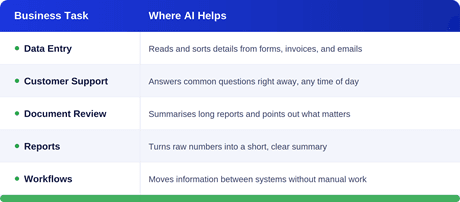
Here is a quick look at where AI fits across these five tasks:
AI Is Not About Replacing Everyone
A common question comes up whenever people talk about AI: will it replace employees? A better question to ask is which parts of your employees' work AI can actually help with.
A customer support agent might spend part of the day on simple questions and the rest on harder problems. AI can take the simple questions. A data team might spend hours sorting information. AI can take on the repetitive parts. A manager might spend hours reading reports. AI can help surface the important points faster.
The goal is not to remove people from the process. It is to free up time for the work that needs real experience, judgment, and creativity.
Start Small
You do not need to launch a huge AI project on day one. Start with one problem.
Look at what your team does every day and ask: what takes up a lot of time but does not need much thinking? Maybe it is data entry, answering common questions, preparing reports, sorting emails, or moving information between systems.
Pick one task, test an AI solution, and measure the results. If it saves time and works well, move on to the next opportunity. Small wins add up quickly.
AI Still Needs People
AI is powerful, but it is not perfect. It can make mistakes, misread information, or give an answer that sounds right but is not. That is why human oversight still matters, especially when AI is working with sensitive information, financial data, security, or important business decisions.
The strongest approach usually combines both.
AI brings speed. People bring judgment.
Together, they build workflows that are faster and more reliable.
Final Thoughts
AI does not have to be complicated, and you do not need to transform your whole business overnight. Start by looking at the small tasks eating up your team's time: the repetitive work, the information that takes too long to process, the questions your team fields again and again. Then ask yourself a simple question: can AI help us do this better?
Sometimes the answer will be yes, and sometimes the best AI solution turns out to be surprisingly small. Saving a few hours a week may not sound like much, but spread across a whole team, it adds up to a real difference.
The best use of AI is not using it everywhere. It is using it where it actually solves a problem.