
.png&w=3840&q=75)
AI Is Changing What Businesses Expect From Cloud Infrastructure
You don't need bigger servers. You need a setup that fits the work you actually do.
Most businesses start using AI in a small way.
Maybe it's a chatbot that answers customer questions. Maybe it's a tool that writes reports, or helps staff sort through information. At first, everything feels easy. You sign up, connect your data, and start using it.
Then AI becomes part of daily work, and a new question pops up.
Can your cloud infrastructure keep up with what your business wants to do next?
The cloud used to be a place to host a website or store files. Now it's a big part of many AI plans. That doesn't mean you need expensive servers or a complete rebuild. It means you should think a little more carefully about how your technology supports your future.
So, let's look at what is changing.
AI Asks More From Your Cloud
Regular business apps usually handle simple jobs, like managing orders or storing customer details. AI apps can add new demands. Some need more computing power, some need lots of data, and some need faster processing. It depends on the type of AI you use.
A company using an AI writing assistant has very different needs from a company training its own machine learning model. Many businesses simply use cloud-based AI services. Others need special infrastructure for their own applications.
So understand your real workload before you choose a solution. Bigger isn't always the right answer.
1. The Cloud Does More Than Host Apps
For years, businesses used the cloud to run websites, store information, and manage software. Now it also supports AI features, analytics, and automation. So people expect more from it. They want a setup that can:
- Handle changes in workload
- Connect different applications
- Support AI-powered features
- Keep business data protected
- Grow with the company
Think about an online shop. It starts with a simple website, then adds customer analytics, automated support, and personalized recommendations. Each new feature brings new infrastructure needs. That's why cloud planning shouldn't stop the day an application goes live.
2. AI Growth Brings New Cost Questions
AI can save time, but running it can also raise your technology costs. More computing power, more data, and more frequent use all add up.
Imagine a company that adds an AI feature to its internal software. At first, only a few employees use it. Then more teams join, and requests keep climbing. If nobody is watching, the bill can grow much faster than planned.
A few simple checks help. Every so often, review:
- Which resources you are using
- Whether your applications need more or less capacity
- How your cloud services are billed
- Whether unused resources can be removed
You don't need to avoid spending on technology. You just want that spending to support real business needs.
3. Cloud Security Has to Keep Up
AI tools often connect to your business data and your existing applications. That raises some questions.
- What information can the AI tool access?
- Who is allowed to use it?
- Where is the data processed?
- What happens if it connects to a system with sensitive information?
These matter even more when AI is used across different teams. Say an employee connects an AI tool to the company's document system. If access permissions are poorly managed, the wrong people could see the wrong files.
The technology isn't the only issue. How it's set up and used matters just as much. So think about security before you add AI to important workflows, not after a problem shows up.
4. Not Every Business Needs Its Own AI Setup
A common mistake is thinking every company needs a large AI environment. It doesn't. A small business might simply use an existing AI service through an app or API. Another may need more control over its data, models, and computing environment. Here's how that can look:
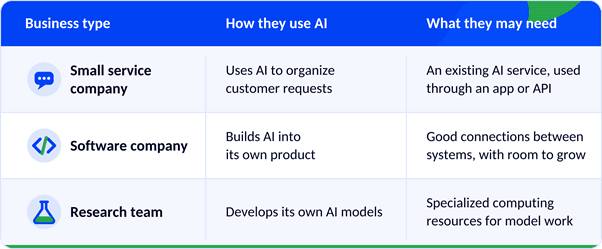
The right choice depends on your workload, data sensitivity, performance needs, budget, and future growth. Using the cloud doesn't mean picking the most powerful option. It means picking the one that fits the work.
5. Plan for Growth Early
A cloud setup that works for a small application may need changes as your business grows. More users, more data, and more connected systems can all affect performance.
This is especially true when AI features are added one at a time. One automated workflow becomes several, all connected to databases, customer platforms, and internal applications. Without a plan, things get harder to manage. So ask early:
- Can our systems handle more usage?
- How will new AI tools connect to our current applications?
- Do we have reliable backups?
- Can we monitor performance?
- What happens if a service goes down?
These aren't only technical questions. They affect your daily operations and your customers' experience.
6. The Future Is Flexible, Not Just Bigger
AI is increasing the demand for computing power. But businesses are also asking where their systems should run.
Some companies use public cloud services. Others mix public cloud, private infrastructure, and on-site systems. This is often called a hybrid approach. A business might choose it for more control over certain data, specific performance needs, or to work with systems it already has.
A flexible plan lets you decide where each workload should run, instead of forcing everything into one place.
What Should You Do Now?
You don't need to change your whole cloud setup just because AI is growing. Start with a clear review.
First, know what you have. List the applications you use, where your data is stored, and how your systems are managed.
Next, look ahead. Are you planning to add AI features? Will your customer base grow? Do you expect more data processing?
Then, check costs and security. Review resource usage, access permissions, monitoring, and backups.
Finally, choose what fits. Pick improvements based on real needs. Sometimes that's better monitoring. Sometimes it's application optimization, a cloud migration, or a new infrastructure design.
There's no single answer for every business.
How Kenora Can Help
At Kenora Technologies, we see cloud services as part of a business's wider needs. Our cloud service areas include:
- Cloud architecture and migration
- Monitoring and alerting
- Backup and disaster recovery
- Infrastructure support and scaling
If you're planning to bring in AI, a good first step is understanding your existing infrastructure. How are your applications connected? Where is your data stored? Can your current environment support the workload you have in mind? With the right assessment and planning, you can make a more informed decision about your next step.
The goal isn't to add AI just because it's popular. It's to build a reliable foundation for technology that is actually useful.
Want to talk it through? Visit www.kenora.lk or email us at [email protected].
Final Thoughts
AI is changing what businesses expect from cloud infrastructure. Companies want more flexibility, better performance, stronger security, and clearer control over costs.
But you don't have to chase every new trend. Just understand what your operations need today, and what they may need tomorrow.
A strong cloud environment is not only about more computing power. It's about a setup that supports your people, your applications, and your goals. AI may be changing the future of technology, but a well-planned infrastructure is what helps a business move toward it with confidence.